GUI replies#
A GUI reply is a GUI component the agent sends as a message in the conversation. The client receives it and renders it inline, just like a text message — but instead of plain text, the user sees a form, a chart, a data table, or any other BESSER BUML view element.
This is useful when the conversation reaches a point where structured input or a rich visual is the best way to interact with the user.
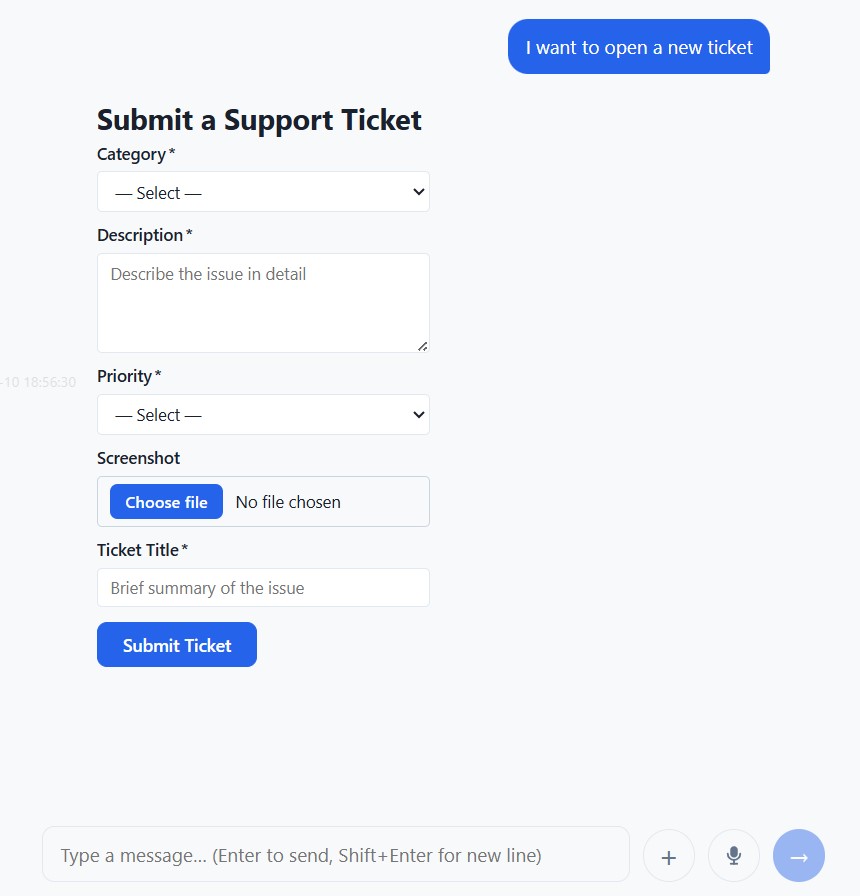
A form rendered inline as a GUI reply inside the chat conversation.#
AgentGUI#
The AgentGUI class is BAF’s wrapper around a BESSER
BUML GUIModel. It adds a few extra attributes that control how the GUI behaves when
sent as a reply.
from baf.core.gui.agent_gui import AgentGUI

agent_gui = AgentGUI(
    model,            # a besser GUIModel instance
    gui_id='my_form', # optional; auto-generated UUID if omitted
    persist=True,     # track input changes in the session (see below)
    width='480px',    # optional CSS width for the chat bubble
)
The key attributes of AgentGUI are:
model — the underlying
GUIModelbuilt with the BESSER BUML library.id — a unique string identifier for this GUI component. Used to distinguish between multiple GUI replies in the same session, and to match form submissions to the right
AgentGUI.persist — when
True, input changes and form submissions are automatically tracked insession.gui_inputs(see Persisting form inputs below).width — a CSS width value (e.g.
'480px','60%') that overrides the default chat bubble width. Use wider values for multi-column layouts or charts, and narrower ones for simple forms.
Sending a GUI reply#
Use reply_gui()
from a state body to send a GUI to the user:
def show_form_body(session: Session):
    websocket_platform.reply_gui(session, registration_gui)
The GUI model is serialised to JSON and sent to the client, which renders it in the
chat thread. From that moment, any interaction with the GUI elements (typing in a
field, clicking a checkbox, submitting a form) generates GUIEvent
events that are dispatched back to the agent.
Building a GUIModel#
GUIModel objects are built with the BESSER BUML library. Below is a minimal
example that creates a two-field registration form:
from besser.BUML.metamodel.gui import (
    GUIModel, Module, Screen,
    Form, InputField, InputFieldType,
)
from baf.core.gui.agent_gui import AgentGUI

# Define the form fields
name_field = InputField(
    name="full_name",
    description='Text input field',
    field_type=InputFieldType.Text,
    label="Full Name",
    required=True,
)
email_field = InputField(
    name="email",
    description='Email input field',
    field_type=InputFieldType.Email,
    label="Email",
    required=True,
)

# Group them in a Form component
form = Form(
    name="registration_form",
    description='Form for registration',
    fields=[name_field, email_field],
    inputFields={name_field, email_field},
    submit_label="Register",
)

# Assemble the screen and model
screen = Screen(name="home", view_elements={form}, is_main_page=True, description='Home')
module = Module(name="main", screens={screen})
gui_model = GUIModel(
    name="RegistrationUI",
    description='aaa',
    package="",
    versionCode="1.0",
    versionName="1.0",
    modules={module},
)

# Wrap in AgentGUI
registration_gui = AgentGUI(gui_model, gui_id="registration_form", persist=True)
Note
The BESSER BUML library supports a wide range of view elements: text, buttons, images, links, charts, tables, metric cards, and many input field types (text, dropdown, checkbox group, rating, slider, date range, and more). Refer to the BESSER documentation for the full reference.
Persisting form inputs#
When persist=True is set on an AgentGUI, BAF
automatically keeps track of every input change and form submission for that GUI in
session.gui_inputs.
session.gui_inputs is a dictionary keyed by GUI id. Each entry is itself a
dictionary of {field_name: value} pairs that reflect the latest known state of
every form field:
# After the user has interacted with the form, gui_inputs holds the latest values
def process_registration_body(session: Session):
    data = session.gui_inputs.get('registration_form', {})
    name  = data.get('full_name', '')
    email = data.get('email', '')
    session.reply(f'Thanks, {name}! We will reach out at {email}.')
The dictionary is updated in two ways:
On field change (
onChangeevents): the individual field’s value is updated.On form submission (
onSubmitevents): all field values from the submission are merged in at once.
Note
session.gui_inputs is only populated for GUI replies that have persist=True.
If persist=False (the default), input events are still dispatched to the agent
as regular GUIEvent objects,
but their values are not automatically stored.
Reacting to GUI events#
Every interaction with a GUI component — changing a field, clicking a button,
submitting a form — generates a GUIEvent
that the agent receives.
You can react to any GUI event using a generic when_event transition:
from baf.library.transition.events.base_events import GUIEvent

state1.when_event(GUIEvent()).go_to(state2)
For form submissions specifically, BAF provides the dedicated
when_form_submitted() transition. It uses a
FormSubmitMatcher condition and is
triggered only when an onSubmit event is received. Optionally, you can restrict
it to submissions from a specific form by passing the GUI’s id:
# Triggered by any form submission
state1.when_form_submitted().go_to(process_state)

# Triggered only when registration_gui is submitted
state1.when_form_submitted(form_id=registration_gui.id).go_to(process_state)
See Transitions for a full description of when_form_submitted and
the other available transitions.
Controlling the bubble width#
By default, GUI replies are displayed at the same width as regular chat messages (up
to 78 % of the chat area). For wider layouts — two-column forms, charts, tables — set
the width attribute on the AgentGUI:
# Fixed pixel width
wide_gui = AgentGUI(model, width='720px')

# Percentage of the chat area width
half_gui  = AgentGUI(model, width='50%')
The width can be any valid CSS length value. The chat bubble expands to the given size, and the GUI content fills it. If no width is set, the bubble follows the standard chat message sizing rules.
Full example#
Putting it all together: an agent that shows a registration form, waits for the user to submit it, and then confirms the submission.
from baf.core.agent import Agent
from baf.core.gui.agent_gui import AgentGUI
from baf.core.session import Session

agent = Agent('registration_agent')
websocket_platform = agent.use_websocket_platform(use_ui=True)

show_form_state    = agent.new_state('show_form',    initial=True)
process_form_state = agent.new_state('process_form')
done_state         = agent.new_state('done')

# Build and wrap the GUI (see "Building a GUIModel" above)
registration_gui = AgentGUI(model, gui_id='reg_form', persist=True, width='480px')

def show_form_body(session: Session):
    session.reply('Please fill in the registration form below:')
    websocket_platform.reply_gui(session, registration_gui)

show_form_state.set_body(show_form_body)
show_form_state.when_form_submitted(form_id='reg_form').go_to(process_form_state)

def process_form_body(session: Session):
    data  = session.gui_inputs.get('reg_form', {})
    name  = data.get('full_name', '(unknown)')
    email = data.get('email', '(unknown)')
    session.reply(f'Registration received! Name: {name}, Email: {email}.')

process_form_state.set_body(process_form_body)
process_form_state.go_to(done_state)

def done_body(session: Session):
    session.reply('All done!')

done_state.set_body(done_body)

if __name__ == '__main__':
    agent.run()
Generating a GUI reply with an LLM#
Instead of constructing a GUIModel manually, you can describe the desired GUI in
plain text and let an LLM build it for you.
create_gui_with_llm() instructs the LLM to produce a JSON
object conforming to the AgentGUI schema, then deserializes it into a ready-to-send
AgentGUI. If the first response is invalid, the error
is fed back to the LLM and the call is retried up to max_retries times (default
2). On final failure it logs an error and returns None.
from baf.core.gui.gui_llm import create_gui_with_llm

def answer_body(session: Session):
    gui = create_gui_with_llm(
        llm=gpt,
        prompt=session.event.message,
    )
    if gui is not None:
        websocket_platform.reply_gui(session, gui)
    else:
        session.reply("Sorry, I could not generate that UI.")
Pass gui_id to assign a stable identifier (useful for form-submission matching) and
max_retries to control how many correction attempts are made:
gui = create_gui_with_llm(
    llm=gpt,
    prompt="A registration form with name, email and a Submit button.",
    gui_id="reg_form",
    max_retries=3,
)
API References#
AgentGUI:
baf.core.gui.agent_gui.AgentGUIcreate_gui_with_llm():
baf.core.gui.gui_llm.create_gui_with_llm()AgentGUI.id:
baf.core.gui.agent_gui.AgentGUI.idAgentGUI.persist:
baf.core.gui.agent_gui.AgentGUI.persistAgentGUI.width:
baf.core.gui.agent_gui.AgentGUI.widthGUIEvent:
baf.library.transition.events.base_events.GUIEventSession:
baf.core.session.SessionSession.gui_inputs:
baf.core.session.Session.gui_inputsState.when_event():
baf.core.state.State.when_event()State.when_form_submitted():
baf.core.state.State.when_form_submitted()WebSocketPlatform.reply_gui():
baf.platforms.websocket.websocket_platform.WebSocketPlatform.reply_gui()